How to view the ICNs impacting your Group
Modified on Mon, 13 Jan, 2025 at 2:24 PM
TABLE OF CONTENTS
Introduction
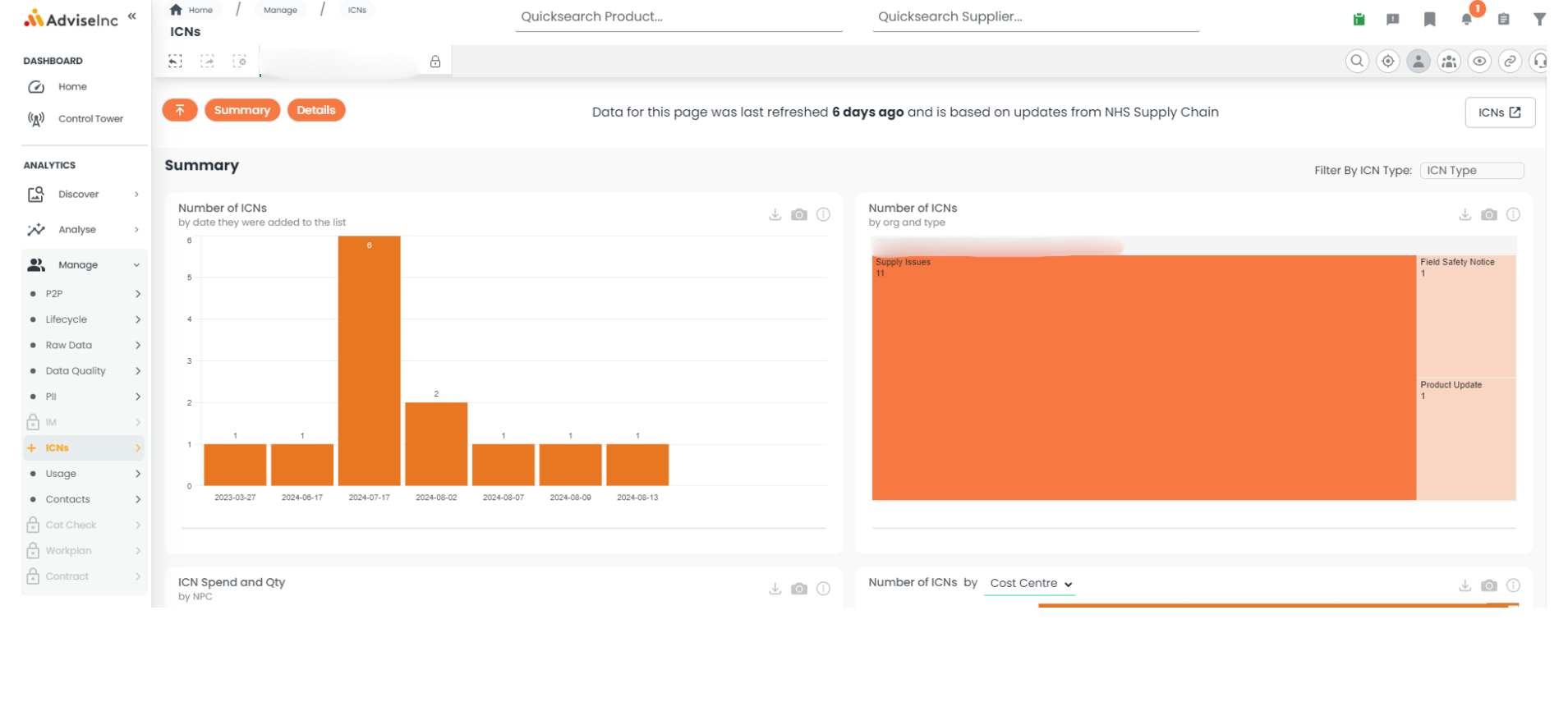
This article explains where you can view the latest Important Customer Notices (ICNs) and how these impact your organisation, by connecting NHSSC ICNs with your spend data.
Step-by-Step Guide
- Navigate to Manage > ICNs with the left-hand navigation panel.
- View number of ICNs by date, Organisation, and type in the tiles at the top of the page.
- Scroll down to view ICNs by NPC and categories (e.g., Cost Centre or eClass).
- Click "Details" (orange navigation button) to view a table with type, NPC affected, and other details.
Notes And Tips
- This page refreshes weekly on Fridays. You can find the most recent refresh date along the top of the page.
If you have any questions, please don’t hesitate to get in touch at support@adviseinc.co.uk or phone us on 0207 112 9222.
Was this article helpful?
That’s Great!
Thank you for your feedback
Sorry! We couldn't be helpful
Thank you for your feedback
Feedback sent
We appreciate your effort and will try to fix the article