AdviseInc Platform - v1.1.3 (27/09/23)
Modified on Tue, 26 Sep, 2023 at 9:21 PM
TABLE OF CONTENTS
New Features and Enhancements
We continually evolve Platform with a roadmap of development that we’ll release over the next 12 months. We’ve highlighted some of the new features in this latest release below for you.
#1 - Choose to keep your filter panel open
What is it?
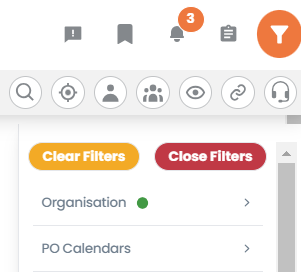
You can now decide whether to keep your filter panel open at all times or close it off to the side. We’ve also made it even easier to use the filters by allowing you to start typing immediately when you select the filter drop-down.
Why have we done this?
Teams asked for it. Many of you missed the old days of PD and PB when you could always see the filters available to you so now we have given you the choice. You view your filter panel your way.
Where can I find this in Platform?
Click the filter icon in the top right of the screen
Choose the filters you would like to add, as before
Continue to navigate around Platform and the filter panel will stay in place
To close the filter panel simply click the ‘Close Filters” button
To clear all of your filters click the “Clear Filters” button on the filter panel
#2 - View or hide your KPIs, your choice.
What is it?
On most of the pages in Platform, we include KPIs running along the top. You can now decide whether you want to see these or not. Allowing you quicker access to the analytics below.
Why have we done this?
To make pages load even faster for you all. Platform KPIs are dependent on the filters you have selected and can take a moment to load. By hiding the KPIs this will speed up the time it takes to load each page. We also wanted to give you more space on the screen to view the main analytics section.
Where can I find this in Platform?
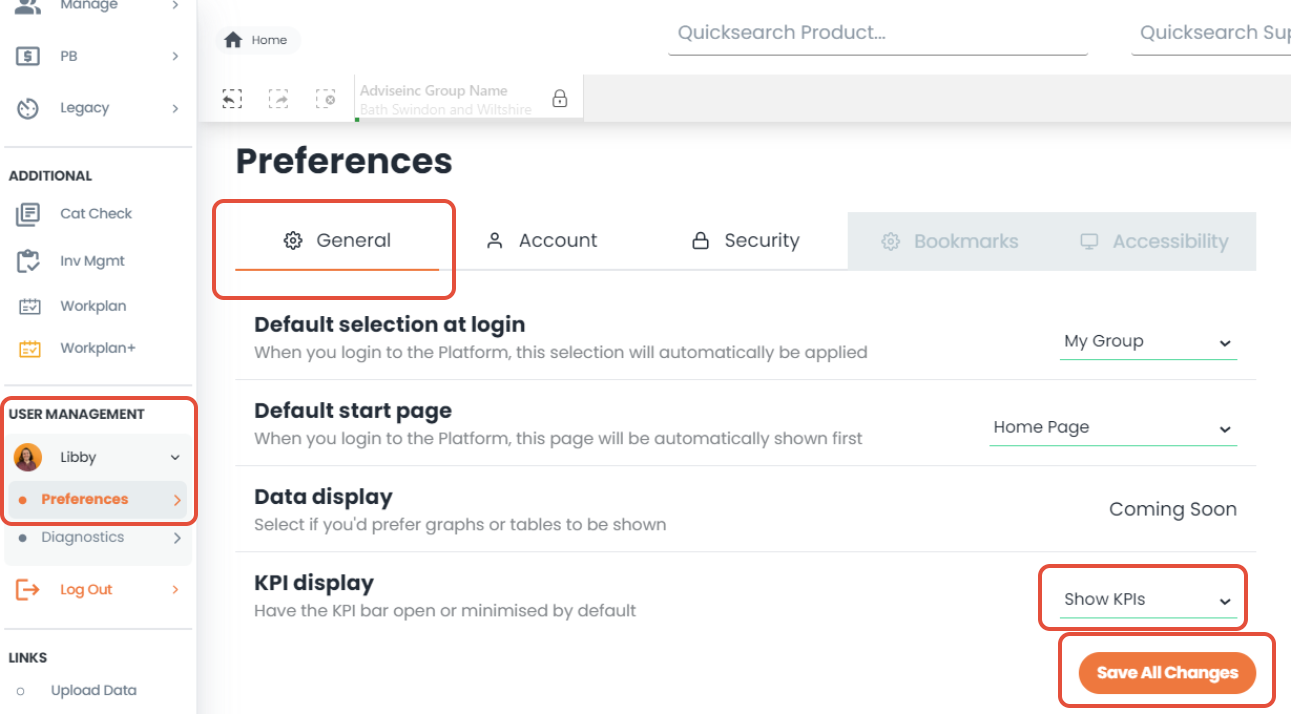
Left-hand navigation pane, head to the USER MANAGEMENT section
Click on your name (Libby in the example below) and go to Preferences.
Under General, you’ll see ‘KPI Display’
On the drop-down, you can choose whether to Hide or Show KPIs
Hit Save all changes to store.
Alternatively, you can change this temporarily for a page by clicking the eye icon in the top right of the page to:
Show KPIs - the icon will be highlighted in orange
Hide KPIs - the icon will be grey
Other preferences that you can update can be found here.
#3 - You can now filter by ‘Invoice Status’
What is it?
You can now choose to filter by invoice status, for example, paid, cancelled, partially paid or rejected.*
*Depends on whether your organisation provides this information in your invoice data
Why have we done this?
This was requested by teams, we’ve always given you the ability to filter by it under the custom page but now we have made it even easier by bringing it under the filters.
Where can I find this in Platform?
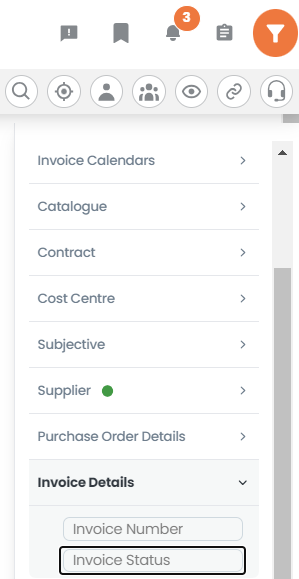
Click the filter icon in the top right of the screen
Click the ‘Invoice Details’ filter sections
Select ‘Invoice Status’ and select your desired status*
*these statuses are dependent on your Invoice data and the fields you provide us.
Bug Fixes
A full list of enhancements and bug fixes is available in Platform under the ‘CHANGELOG’ section, accessed from the left-hand navigation bar.
Future releases
We’re always working on new features. Here’s a sneak peek of some of the ones we’re working on for a future release.
Redesign of Price Benchmarking (PB) section
Was this article helpful?
That’s Great!
Thank you for your feedback
Sorry! We couldn't be helpful
Thank you for your feedback
Feedback sent
We appreciate your effort and will try to fix the article